How to run clustering analysis
Problem Statement
Data does not typically come labeled and labeling/verifying labels is a time and resource intensive process. Exploratory data analysis (EDA) can often be enhanced by splitting data into similar groups.
Clustering is a method which groups data in the format of (samples, features). This can be used with images or image embeddings as long as the arrays are flattened to only contain 2 dimensions.
The Clusterer class utilizes a clustering algorithm based on the HDBSCAN algorithm and outputs outliers and duplicates.
When to use
The Clusterer can be used during the EDA process to perform the following:
group a dataset into clusters
verify labeling as a quality control
identify outliers in your dataset
identify duplicates in your dataset
What you will need
A 2 dimensional dataset (samples, features)
A Python environment with the following packages installed:
dataeval or dataeval[all]matplotlib
This could be a set of flattened images or image embeddings. We recommend using image embeddings (with the feature dimension being <=1000).
Getting Started
Let’s import the required libraries needed to set up a minimal working example.
import matplotlib.pyplot as plt
import numpy as np
import sklearn.datasets as dsets

from dataeval.metrics.estimators import clusterer
Loading in data
For the purposes of this demonstration, we are just going to create a generic set of blobs for clustering.
This is to help show all of the functionalities of the clusterer in one tutorial.
# Creating 5 clusters
test_data, labels = dsets.make_blobs(
    n_samples=100,
    centers=[(-1.5, 1.8), (-1, 3), (0.8, 2.1), (2.8, 1.5), (2.5, 3.5)],
    cluster_std=0.3,
    random_state=33,
)  # type: ignore
Because the clusterer can also detect duplicate data, we are going to modify the dataset to contain a few duplicate datapoints.
test_data[79] = test_data[24]
test_data[63] = test_data[58] + 1e-5
labels[79] = labels[24]
labels[63] = labels[58]
Visualizing the clusters
# Mapping from labels to colors
label_to_color = np.array(["b", "r", "g", "y", "m"])

# Translate labels to colors using vectorized operation
color_array = label_to_color[labels]

# Additional parameters for plotting
plot_kwds = {"alpha": 0.5, "s": 50, "linewidths": 0}

# Create scatter plot
plt.scatter(test_data.T[0], test_data.T[1], c=color_array, **plot_kwds)

# Annotate each point in the scatter plot
for i, (x, y) in enumerate(test_data):
    plt.annotate(str(i), (x, y), textcoords="offset points", xytext=(0, 1), ha="center")
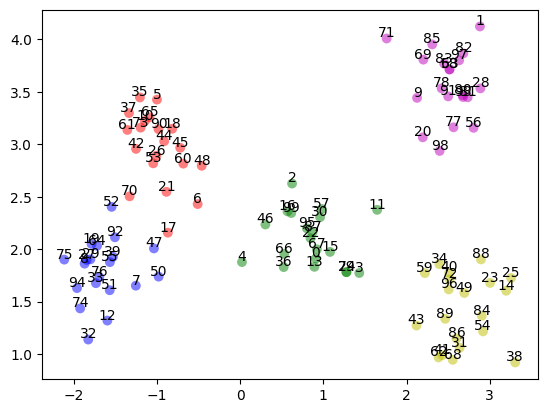
# Verify the number of datapoints and that the shape is 2 dimensional
print("Number of samples: ", len(test_data))
print("Array shape:", test_data.ndim)
Number of samples:  100
Array shape: 2
Running the Clusterer
We are now ready to run the data through the clusterer and inspect the results.
# Evaluate the clusters
clusters = clusterer(test_data)
Results
We can list out each category followed by the number of items in the category and then display those items on the line below.
For the outlier and potential outlier results, the clusterer provides a list of all points that it found to be an outlier.
For the duplicates and near duplicate results, the clusterer provides a list of sets of points which it identified as duplicates.
# Show results
exact_duplicates, near_duplicates = clusters.find_duplicates()
print("exact duplicates: ", exact_duplicates)
print("near duplicates: ", near_duplicates)

outliers = clusters.find_outliers()
print("outliers: ", outliers)
exact duplicates:  [[24, 79], [58, 63]]
near duplicates:  [[0, 13, 15, 22, 30, 57, 67, 87, 95], [3, 79], [8, 27, 29], [10, 65], [16, 99], [19, 64], [31, 86], [33, 76], [36, 66], [39, 55], [40, 72, 96], [41, 62], [58, 83], [78, 91], [80, 81, 93], [82, 97]]
outliers:  []
We can see that there were no outliers but there are also 2 sets of duplicates and 16 sets of near duplicates.