Image Statistical Analysis
The image statistics functions assist with understanding the dataset.
These can be used to get a big picture view of the dataset and it’s underlying
distribution. These functions create the data distribution that the Outliers
class uses to identify outliers.
What are the statistical analysis functions
There are seven different DataEval stat functions for analyzing a dataset:
boxratiostatsdimensionstatshashstatsimagestatslabelstatspixelstatsvisualstats
The information below includes what each function does and the statistical analysis metrics that are included in each function.
boxratiostats
The boxratiostats() function calculates the ratio of the bounding box
outputs to the image outputs.
This function can be used with the output from:
This function requires both a bounding box output and an image output from the above mentioned stat functions.
This function can be used in conjunction with the Outliers class to determine
if there are issues with any of the images in the dataset.
imagestats
The imagestats() function provides an easy way to run the pixelstats
and visualstats on the images of a dataset or over each channel of the images
of a dataset.
dimensionstats
The dimensionstats() function is an aggregate metric that calculates
various dimension based statistics for each individual image:
Metric |
Description |
|---|---|
channels |
Number of color channels in the image |
height |
Height of the image in pixels |
width |
Width of the image in pixels |
size |
Area of the image in pixels |
aspect_ratio |
Width of the image divided by the height |
depth |
Automatic calculation of the bit depth of the image based on max and min image values |
left |
The x value (in pixels) of the top left corner of the image or bounding box |
top |
The y value (in pixels) of the top left corner of the image or bounding box |
center |
The x and y value (in pixels) of the center of the image or bounding box |
distance |
The distance between the center of the image and the center of the bounding box |
invalid_box |
Whether the box is out of bounds or has no area |
This function expects the image in a CxHxW format and uses this standard format to populate the width, height and channels metrics.
This function can be used in conjunction with the Outliers class to determine
if there are any issues with any of the images in the dataset.
hashstats
The hashstats() function is an aggregate metric that calculates various
hash values for each individual image:
Metric |
Description |
|---|---|
exact image matching |
|
perceptual hash based near image matching |
This function can be used in conjunction with the Duplicates class in order to identify duplicate images.
labelstats
The labelstats() function provides summary statistics across classes
and labels:
Metric |
Description |
|---|---|
label_counts_per_class |
Total number of labels for each class |
label_counts_per_image |
Total number of labels for each image |
image_counts_per_label |
Total number of images for each label |
image_indices_per_label |
Dictionary tracking image number for each label |
image_count |
Total number of images |
label_count |
Total number of labels |
class_count |
Total number of class |
pixelstats
The pixelstats() function is an aggregate metric that calculates normal
statistics about pixel values for each individual image:
Metric |
Description |
|---|---|
mean |
average pixel value across entire image |
std |
standard deviation of pixel values across entire image |
var |
variance of pixel values across entire image |
skew |
measure of how normally distributed the data is |
kurtosis |
measure of how normally distributed the data is |
entropy |
Shannon entropy based on the histogram, \(-\sum p \log p\) |
missing |
total number of pixels missing a value as a percentage of total pixels |
zeros |
total number of pixels with a zero value as a percentage of total pixels |
histogram |
scales pixel values between 0-1 and binned into 256 bins |
This function can be used in conjunction with the Outliers class to determine
if there are any issues with any of the images in the dataset.
visualstats
The visualstats() function is an aggregate metric that calculates visual
quality statistics for each individual image:
Metric |
Description |
|---|---|
brightness |
The value of the 25th percentile |
sharpness |
The standard deviation of a 3x3 edge filter |
contrast |
(max value - min value) / mean value |
darkness |
The value of the 75th percentile |
percentiles |
The 0, 25, 50, 75, and 100 percentile values of the pixel distribution |
This function can be used in conjunction with the Outliers class to determine
if there are any issues with any of the images in the dataset.
When to use the statistical analysis functions
The functions are automatically called when using Outliers.evaluate on data.
Therefore, the functions themselves don’t usually need to be called on the data.
However, there are a few scenarios that lend themselves to using the functions
independently:
When multiple sets of data as well as the combined set are to be analyzed, it can be easier to run the stat functions on each individual set of data and then pass in the outputs to the Outlier class in each of the desired data combinations for analysis.
When comparing the resulting data distribution between two or more datasets to determine how similar the datasets are.
When visualizing the resulting data distribution after using one or more of the stat functions.
Example visualizing the resulting data distribution
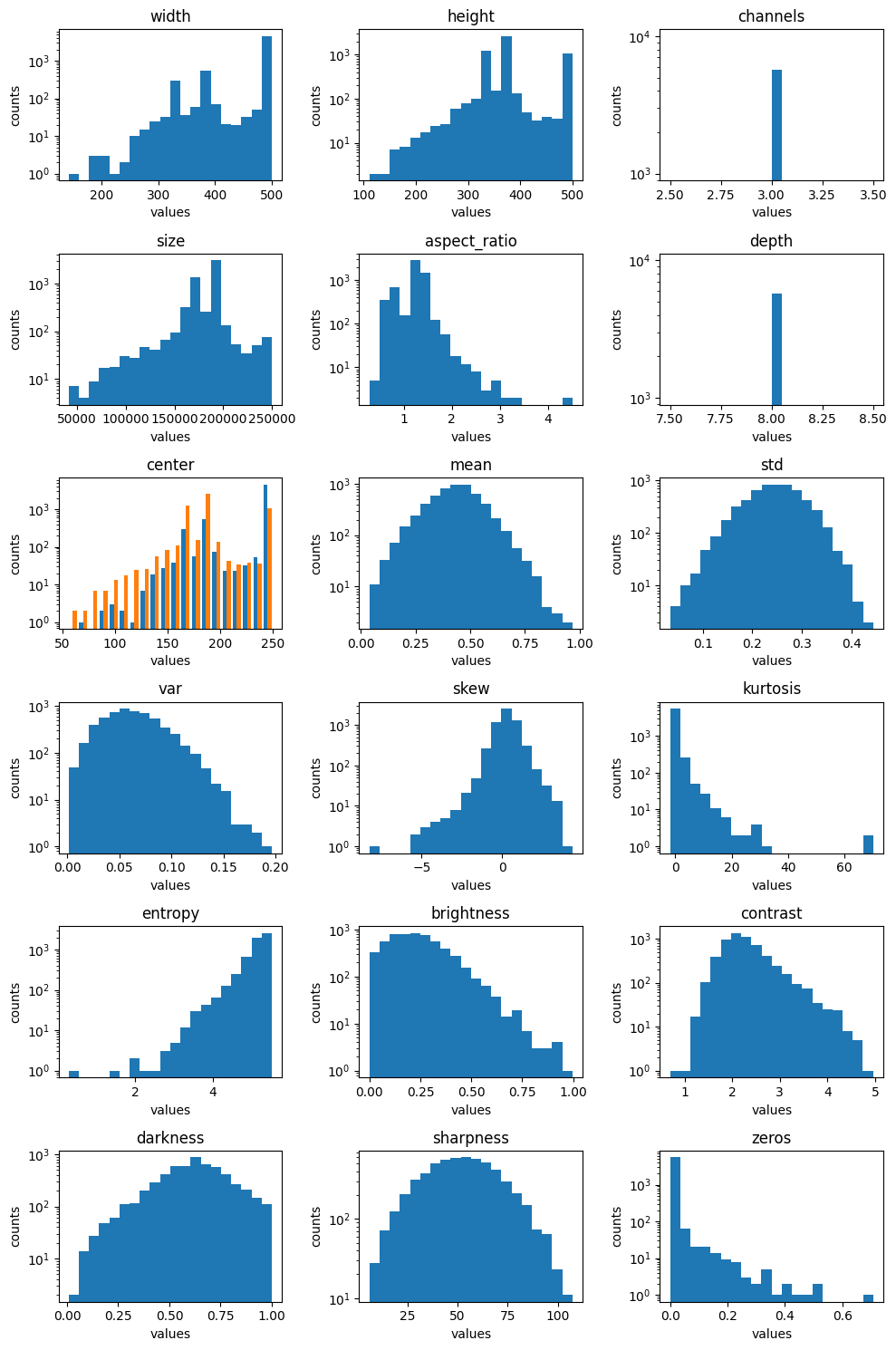
The output for each function contains a plot function which plots
a histogram of the data results, except for the hashstats function whose
results are grouped lists and has no visualization function, and the
labelstats function whose results can be visualized instead with the
to_table function.
Example code and result for the imagestats function for images:
# Load the statistic metric from DataEval
from dataeval.metrics.stats import imagestats

# Loading in the PASCAL VOC 2011 dataset for this example
to_tensor = v2.ToImage()
ds = VOCDetection(
    "./data",
    year="2011",
    image_set="train",
    download=True,
    transform=to_tensor,
)

# This stat function takes about 1-3 minutes to run depending on your hardware

# Calculate the imagestats for the images
# Note: the stat function expects the images as a dataset
#       with images in the (C,H,W) format
stats = imagestats(ds)

# Visualize the results
stats.plot(log=True)
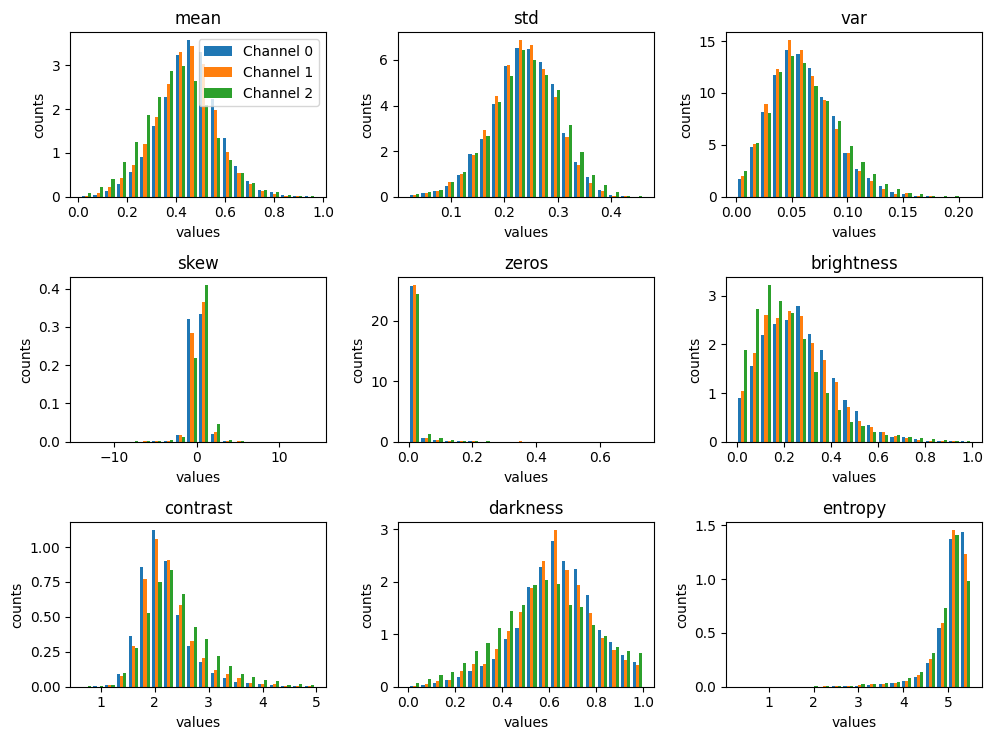
Example code and result for the imagestats function for channels per image:
# Load the statistic metric from DataEval
from dataeval.metrics.stats import imagestats

# Loading in the PASCAL VOC 2011 dataset for this example
to_tensor = v2.ToImage()
ds = VOCDetection(
    "./data",
    year="2011",
    image_set="train",
    download=True,
    transform=to_tensor,
)

# This stat function takes about 1-3 minutes to run depending on your hardware

# Calculate the imagestats per channel for the images
# Note: the stat function expects the images as a dataset
#       with images in the (C,H,W) format
ch_stats = imagestats(ds, per_channel=True)

# Visualize the results
ch_stats.plot(log=False, channel_limit=3)
Using the visualization for a quick analysis
Visualizing the distribution of values for each metric allows one to quickly inspect the metrics for unusual distributions. In general, each metric should follow either a normal distribution or a uniform distribution.
With a uniform distribution, you want to notice if any of the plots have areas that are a lot shorter or a lot taller than the rest of the values.
With a normal distribution, you are looking at the edges of the bell curve to see if the values near the edges of the plot raise up or if there are gaps between the edge values and the next value in.
When analyzing the visualizations by channel, you should not be interested in the overall shape of these plots but in the comparison of the shape across each of the individual channels. You want to see if the same shape holds across each channel or if there are large differences between the channels. This is important because discrepancies across channels can help detect image processing errors and channel bias.
For example, below is a quick analysis of the above example plots.
In regards to the imagestats plot, there are a few key insights:
The channel metric has only one value, 3, which is interesting since some of the images in the dataset are greyscale, and greyscale images usually only have 1 channel.
The entropy, zeros, kurtosis, and contrast metrics are single-tailed and all of them have a long tail which indicates that the images whose values are in the edges of the tail are potentially problematic.
Size, aspect ratio, variance, skew, brightness and darkness have skewed or off-center distributions which is another sign of problematic images.
Mean, standard deviation and sharpness appear to have a normal distribution and none have an extended tail, which is a good sign.
While these insights don’t identify the exact images that may be problematic, they highlight where to focus on with further analysis.
In regards to the per-channel plot, the only insight is that there
is very little difference across the channels for each metric.
Therefore, there are no additional concerns beyond those from the
imagestats plot.