Identify bias and correlations
This guide provides a beginner friendly introduction to dataset bias, including balance, diversity and parity.
Estimated time to complete: 15 minutes
Relevant ML stages: Data Engineering
Relevant personas: Data Engineer, T&E Engineer
What you’ll do
Use DataEval to identify bias and correlations in the 2012 VOC dataset
Analyze the results using plots and tables
What you’ll learn
You will see how to identify bias and correlations present in a dataset.
You will understand the potential impact on your data and ways to mitigate them.
What you’ll need
Basic familiarity with Python
Basic understanding of your dataset structure, including but not limited to its metadata
An environment with DataEval installed with the
allextra
Introduction
Identifying any biases or correlations present in a dataset is essential to accurately interpreting your model’s performance and its ability to generalize to new data. A common cause of poor generalization is shortcut learning — where a model uses secondary or background information to make predictions — which is enabled or exacerbated by dataset sampling biases.
Bias and correlations
Understanding biases or correlations present in your dataset is a key component to creating meaningful data splits. Bias in data can lead to misleading conclusions and poor model performance on operational data. There are many different types of bias. A few of these biases occur during data collection, others occur during dataset development, others occur during model development, while others are a result of the user.
Not all forms of bias directly affect the dataset and in order to address the biases that do, you have to make a few assumptions:
All desired classes are present.
All available metadata is provided.
The metadata has been recorded correctly.
If any of the above assumptions are violated, then the analysis will not be accurate. When using your own data, you should verify the above assumptions.
This guide does not focus on eliminating all bias, rather it focuses on identifying the bias that can be found when developing a dataset.
DataEval metrics
DataEval has three dedicated functions for identifying and understanding the
bias or correlations that may be present in a dataset: balance(),
diversity() and parity().
The balance function measures correlational relationships between metadata
factors and classes by calculating the mutual information between the metadata
factors and the labels.
The diversity function measures the evenness or uniformity of the sampling
of metadata factors over a dataset using the inverse Simpson index or Shannon
index.
The parity function measures the relationship between metadata factors
and classes using a chi-squared test.
These techniques help ensure that when you split the data for your projects, you minimize things like shortcut learning and leakage between training and testing sets.
Importing the necessary libraries
You’ll begin by importing the necessary libraries to walk through this guide.
from maite_datasets.object_detection import VOCDetection

# Load the functions from DataEval that are helpful for bias
# as well as the VOCDetection dataset for the tutorial
from dataeval.data import Metadata
from dataeval.metrics.bias import balance, diversity, parity
Step 1: Load the data
You are going to work with the PASCAL VOC 2012 dataset. This dataset is a small curated dataset that was used for a computer vision competition. The images were used for classification, object detection, and segmentation. This dataset was chosen because it has multiple classes and a variety of images and metadata.
If this data is already on your computer you can change the file location from "./data" to wherever the data is stored.
Remember to also change the download value from True to False.
For the sake of ensuring that this tutorial runs quickly on most computers, you are going to analyze only the training dataset, which is a little under 6000 images.
# Download the 2012 train dataset and verify the size of the loaded dataset
ds = VOCDetection(root="./data", download=True, image_set="train", year="2012")
len(ds)
5717
Before moving on, verify that the above code cell printed out 5717 for the size of the dataset.
This ensures that everything is working as needed for the tutorial.
Step 2: Structure the metadata
This guide focuses on evaluating labels and metadata of the dataset rather than the images themselves. As each dataset has its own image and metadata formats, you will need to understand how your particular metadata is structured.
Start by taking a look at the metadata structure of the VOC 2012 dataset by
creating a Metadata class from the dataset.
# Extract the Metadata from the dataset
metadata = Metadata(ds)
The metadata in the dataset is provided as a dictionary entry for each datum, such that the aggregated data is a collection of N metadata dictionaries each with a nested list of M objects in the image. Start by inspecting the raw metadata of the first image.
metadata.raw[0]
{'id': 0,
 'year': '2008',
 'image_id': '000008',
 'mask_path': '/dataeval/docs/source/notebooks/data/vocdataset/VOCdevkit/VOC2012/SegmentationClass/2008_000008.jpg',
 'folder': 'VOC2012',
 'filename': '2008_000008.jpg',
 'database': 'The VOC2008 Database',
 'annotation_source': 'PASCAL VOC2008',
 'image_source': 'flickr',
 'image_width': 500,
 'image_height': 442,
 'image_depth': 3,
 'segmented': 0,
 'pose': ['Left', 'Unspecified'],
 'truncated': [0, 1],
 'difficult': [0, 0]}
Note
Metadata is unable to process nested lists. For this dataset, part is a
factor that describes certain parts of a person object (such as head,
foot and hand), each with separate bounding box coordinates. You will
ignore this information for this example.
Note
The nested objects horse and person from the first metadata entry will be expanded to a complete metadata entry for each object.
Next you will want to select the factors to include for bias analysis as well as the continuous factor bins for any continuous data.
metadata.include = [
    "image_width",
    "image_height",
    "segmented",
    "pose",
    "truncated",
    "difficult",
]

metadata.continuous_factor_bins = {
    "image_width": 5,
    "image_height": 5,
}
Now that the Metadata is ready to go, you can begin analyzing the dataset for bias!
Step 3: Assess dataset balance
The balance() function measures correlational relationships between metadata
factors and classes in a dataset. It analyzes the metadata factors against both the
classes and other factors to identify relationships.
The results can be retrieved using the balance and factors attributes of the output.
bal = balance(metadata)
The information provided by the balance function may be visually understood with a
heat map. The BalanceOutput class contains a plot function to plot the results as
a heat map.
_ = bal.plot()
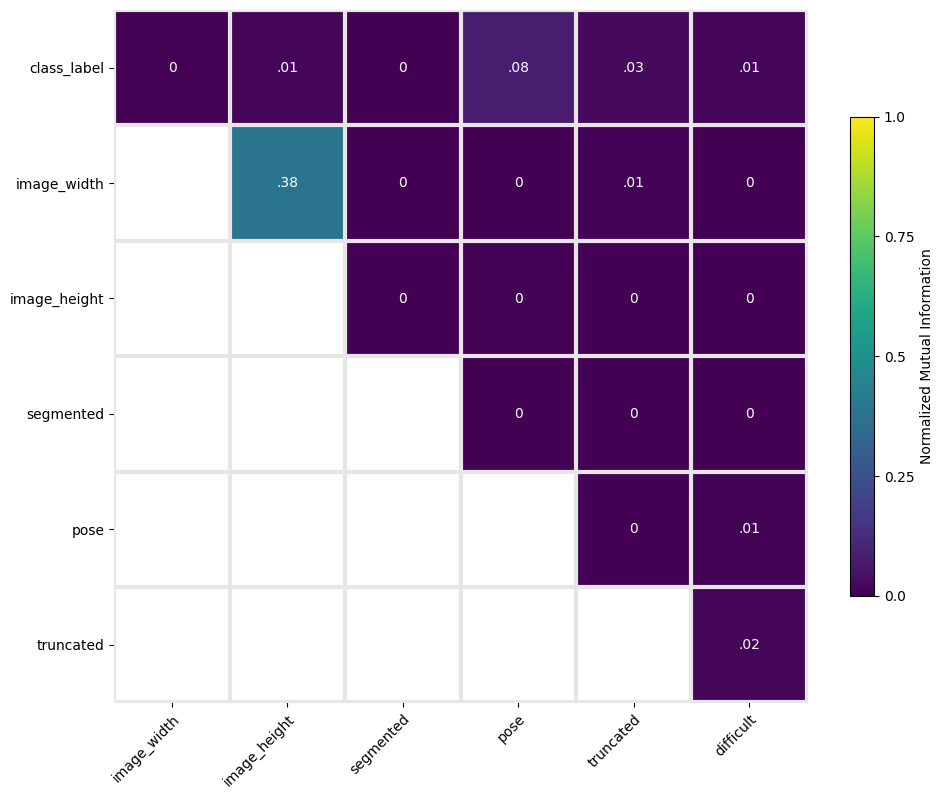
The heatmap shows that the greatest correlations are in the bounding box locations (xmin with xmax and ymin with ymax) and the image dimensions (height and width).
Also the ymax of the bounding box location is correlated with the height of the image. It is not surprising that height and width have correlation since many of the images are similarly sized.
The correlations between xmin and xmax and between ymin and ymax suggests that there is repetition in bounding box width and height across the objects. However, the fact that pose has a value of 0.08 with class means that a few of the classes have specific poses across a fair percentage of the images for that class. An example of this would be most pottedplant images having the same pose value.
In addition to analyzing class and other factors, the balance function also analyzes metadata factors with individual classes to identify relationships between only one class and secondary factors.
Again, the plot function of the balance output class can plot a heatmap of the classwise results for visualizing. The plot_classwise parameter needs to be set to True to use the classwise results.
_ = bal.plot(plot_classwise=True)
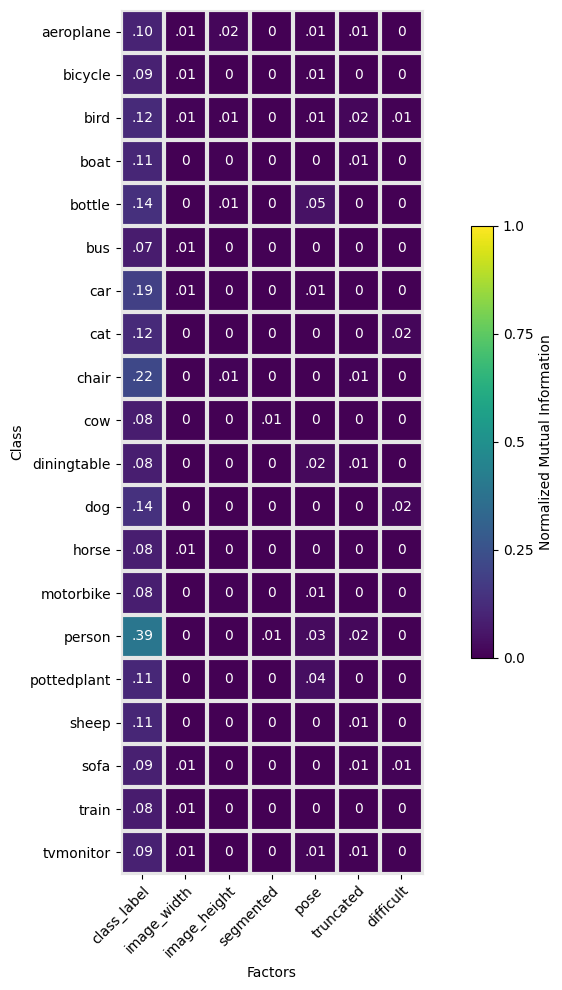
The classwise heatmap shows that factors other than class do not have any significant correlation with a specific class.
Classwise balance shows correlation of individual classes with all class labels, indicating relative class imbalance. In this case the person class is over-represented relative to most other classes.
This means that a model might learn a bias towards the person class label due to its frequency in the training set, which becomes a problem if the test/operational dataset doesn’t have the same imbalance.
Step 4: Assess dataset diversity
The diversity() function measures the evenness or uniformity of the sampling
of metadata factors over a dataset. Values near 1 indicate uniform sampling, while
values near 0 indicate imbalanced sampling, e.g. all values taking a single value.
For more information see the Diversity concept page.
The results can be retrieved using the diversity_index attribute of the output.
div = diversity(metadata)
Again, it’s often easiest to see the differences between the different factors when
visualizing them. The DiversityOutput class contains a plot function to plot the
results of the diversity function. It uses a bar chart to plot the factor-class analysis.
_ = div.plot()
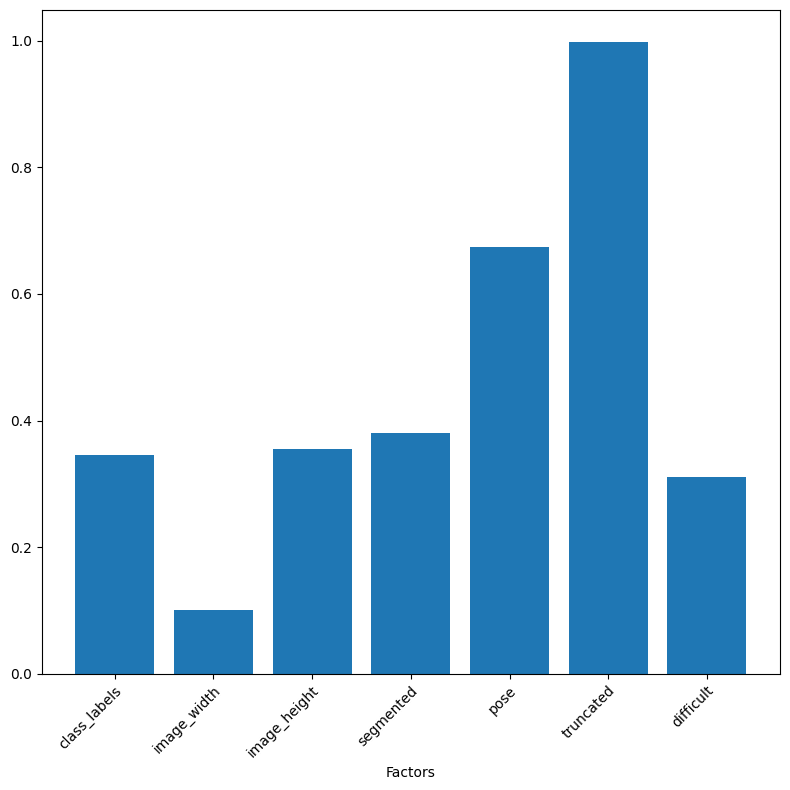
In the results above, the factors truncated and occluded have values near 1, meaning that there is relatively little or no bias in these factors.
The categories of most interest are those that are between 0.4 and 0.1 because this region represents skewed value distributions for the factor.
The following factors fall into this category:
class
width
height
segmented
difficult
These factors contain bias that should be addressed either by adding or removing data to even out the sampling. For instance, the class factor highlights that there is unevenness in the number of data points per class.
In addition to analyzing class, the diversity function also analyzes metadata
factors with individual classes to assess uniformity of metadata factors within
a class. As above, the plot function of the diversity output class can plot a
heatmap of the classwise results for visualizing. The plot_classwise parameter
needs to be set to True to use the classwise results.
_ = div.plot(plot_classwise=True)
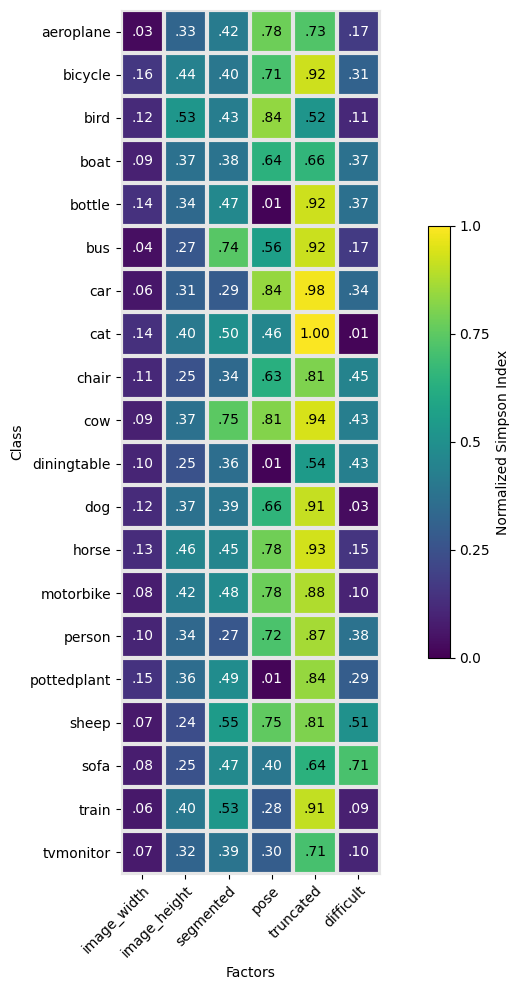
These results expand the above results on a classwise basis.
Things to look for here are large variances for a given factor across the different classes. For example, pose has values ranging from 0.01 to 0.84, which means that a few classes have almost uniform selection of the different pose values while other classes essentially only have one pose value. This makes sense as the bottle or pottedplant class does not have multiple pose directions, while the person class does.
What needs to be further investigated are things like whether the sofa class should have a pose direction, because a diversity value of 0.4 means that a few of the images do while others do not.
Also, the cat class has a low score signifying that most of the images fall into one or two categories rather than being spread even across the categories. This highlights an error in the data collection process — the value was not specified for most cat images and therefore defaulted to “Unspecified”.
An alternative error would be a dataset in which the cat images have most cats facing a specific direction, which would require additional data to overcome the bias, but that is not the case for this dataset. It has plenty of cats facing each direction, but only a few of them contain a pose value.
Step 5: Assess dataset parity
The parity() function measures the relationship between metadata factors
and classes using a chi-squared test. A high score with a low p-value suggests
that a metadata factor is strongly correlated with a class label.
The results can be retrieved using the score and p_value attributes of the output.
par = parity(metadata)
/dataeval/src/dataeval/metrics/bias/_parity.py:147: UserWarning: Factors ['image_width', 'image_height', 'pose', 'difficult'] did not meet the recommended 5 occurrences for each value-label combination.
  warnings.warn(
The warning above states that the metric works best when there are more than 5 samples in each value-label combination. However, because of the large number of total samples, the difference between 1 and 5 samples does not significantly affect the results.
When evaluating the results of parity for a large number of factors, it may be easier to understand the results in a DataFrame.
The ParityOutput class contains a to_dataframe function to format
the results of the diversity function as a DataFrame.
par.to_dataframe()
| score | p-value | |
|---|---|---|
| image_width | 354.43 | 0.0 |
| image_height | 923.09 | 0.0 |
| segmented | 238.41 | 0.0 |
| pose | 4732.10 | 0.0 |
| truncated | 1413.02 | 0.0 |
| difficult | 529.53 | 0.0 |
According to the results, all metadata are correlated with class labels.
However, parity is based on the idea of an expected frequency and how
the observed differs from what is expected. The expected frequencies are
determined by sums of the values for each metadata category.
This function works best when the expected frequencies for a given factor for each individual class are known a priori. For the case above, the expected frequency for the pose metadata category shouldn’t be the same for all classes. The diningtable, pottedplant, and bottle classes only have a single value for pose which automatically throws off the metric because not all of the classes have an identical expected frequency for pose.
Conclusion
Having analyzed the dataset for bias with multiple metrics, the conclusion is that this dataset has bias. Training a model on this dataset has the potential to learn shortcuts and underperform on operational data if the biases are not representative of biases in the operational dataset.
The metadata categories identified by the balance, diversity and parity
functions contain issues such as imbalanced classes and imbalanced parameters per
class. DataEval isn’t able to tell you exactly why they are imbalanced, but it
highlights the categories that you need to check.
As you can see, the DataEval methods are here to help you gain a deep understanding of your dataset and all of its strengths and limitations. It is designed to help you create representative and reliable datasets.
Good luck with your data!
What’s next
In addition to identifying bias and correlations in a dataset, DataEval offers additional tutorials to help you learn about dataset analysis:
To clean a dataset use the Data Cleaning Guide.
To identify coverage gaps and outliers use the Assessing the Data Space Guide.
To monitor data for shifts during operation use the Data Monitoring Guide.
To learn more about the balance, diversity and parity functions, see the Balance, Diversity and Parity concept pages.
On your own
Once you are familiar with DataEval and dataset analysis, you will want to run this analysis on your own dataset. When you do, make sure that you analyze all of your data and not just the training set.