Detecting common augmentations as duplicates
This tutorial demonstrates how DataEval’s duplicate detection methods handle common torchvision augmentations.
Estimated time to complete: 10 minutes
Relevant ML stages: Data Engineering
Relevant personas: Data Engineer, ML Engineer
What you’ll do
Create synthetic test images and apply 30+ torchvision transformations
Run both D4 hash-based and BoVW embedding-based duplicate detection
Compare which transformations each method catches or misses
Tune detection sensitivity with the
cluster_sensitivityparameter
What you’ll learn
Which augmentation types are detectable as near-duplicates (and which aren’t)
When to use D4 hashes vs BoVW embeddings for duplicate detection
How D4 and BoVW have complementary strengths that improve coverage when combined
Quick reference: detection methods
Method |
Best For |
Speed |
Rotation Invariant |
|---|---|---|---|
D4 Hashes (phash_d4, dhash_d4) |
Detecting rotated/flipped copies |
Fast |
Only 90° increments |
BoVWExtractor |
Semantic similarity, different viewpoints |
Slower |
Any angle |
Basic Hashes (phash, dhash) |
Same-orientation near-duplicates |
Fastest |
No |
Key insight: D4 hashes only handle the 8 symmetries of a square (0°, 90°, 180°, 270° + flips). BoVW using SIFT features is invariant to any rotation angle, making it better for detecting arbitrarily rotated duplicates.
What you’ll need
A Python environment with the following packages installed:
dataevalopencv-pythonoropencv-python-headlesstorchvisionmatplotlib
Introduction
Data augmentation is a common technique in deep learning, but augmented images can inadvertently appear in both training and test sets, or be saved as “new” images when they’re really transformations of existing ones. Understanding which augmentations are detectable as near-duplicates helps you:
Identify data leakage - Find augmented copies that leaked between train/test splits
Clean datasets - Remove redundant transformed images
Validate augmentation pipelines - Ensure augmentations create sufficiently distinct images
Getting started
Let’s import the required libraries.
from numbers import Number
from typing import cast

import matplotlib.pyplot as plt
import numpy as np
import torch
import torchvision.transforms.v2 as T
from PIL import Image

from dataeval import config
from dataeval.extractors import BoVWExtractor
from dataeval.flags import ImageStats
from dataeval.quality import Duplicates, DuplicatesOutput

config.set_batch_size(64)
config.set_max_processes(4)
config.set_seed(42)
Creating test data
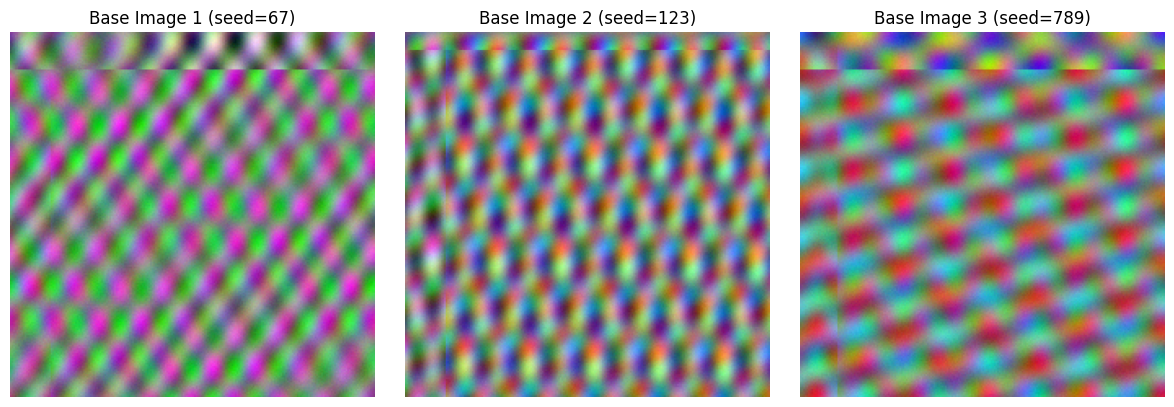
We’ll create a synthetic image with rich texture patterns that SIFT can detect. Then we’ll apply various torchvision transformations to test detection capabilities.
def create_textured_image(seed: int, size: int) -> np.ndarray:
    """Create an image with texture patterns that SIFT can detect.

    Returns image in CHW format (3, H, W) with uint8 values.
    """
    rng = np.random.default_rng(seed)

    # Use the seed to generate random frequencies and phases
    # so each seed produces a genuinely different pattern
    freqs = rng.uniform(1.0, 5.0, size=6)
    phases = rng.uniform(0, 2 * np.pi, size=6)
    channel_offsets = rng.integers(5, 30, size=4)

    x = np.linspace(0, 6 * np.pi, size)
    y = np.linspace(0, 6 * np.pi, size)
    xx, yy = np.meshgrid(x, y)

    # Create pattern with seed-dependent frequency components
    pattern = (
        np.sin(xx * freqs[0] + phases[0]) * np.cos(yy * freqs[1] + phases[1])
        + np.sin(xx * freqs[2] + phases[2]) * np.cos(yy * freqs[3] + phases[3]) * 0.5
        + np.sin(xx * freqs[4] + yy * freqs[5] + phases[4]) * 0.3
        + rng.random((size, size)) * 0.2
    )

    # Normalize to 0-255
    pattern = ((pattern - pattern.min()) / (pattern.max() - pattern.min()) * 255).astype(np.uint8)

    # Create RGB image with seed-dependent channel variations
    img = np.stack(
        [
            pattern,
            np.roll(pattern, int(channel_offsets[0]), axis=0),
            np.roll(pattern, int(channel_offsets[1]), axis=1),
        ],
        axis=0,
    )  # Shape: (3, H, W)

    return img.astype(np.uint8)


def numpy_to_pil(img: np.ndarray) -> Image.Image:
    """Convert CHW numpy array to PIL Image."""
    return Image.fromarray(np.transpose(img, (1, 2, 0)))


def pil_to_numpy(img: Image.Image) -> np.ndarray:
    """Convert PIL Image to CHW numpy array."""
    return np.transpose(np.array(img), (2, 0, 1))


def tensor_to_numpy(tensor: torch.Tensor) -> np.ndarray:
    """Convert torch tensor (CHW, float 0-1 or uint8) to CHW numpy uint8."""
    if tensor.dtype == torch.float32:
        tensor = (tensor * 255).to(torch.uint8)
    return tensor.numpy()
IMG_SIZE = 224

# Create base images
base_img1 = create_textured_image(seed=67, size=IMG_SIZE)
base_img2 = create_textured_image(seed=123, size=IMG_SIZE)
base_img3 = create_textured_image(seed=789, size=IMG_SIZE)

# Display base images
fig, axes = plt.subplots(1, 3, figsize=(12, 4))
for i, (img, title) in enumerate(
    [
        (base_img1, "Base Image 1 (seed=67)"),
        (base_img2, "Base Image 2 (seed=123)"),
        (base_img3, "Base Image 3 (seed=789)"),
    ]
):
    axes[i].imshow(np.transpose(img, (1, 2, 0)))
    axes[i].set_title(title)
    axes[i].axis("off")
plt.tight_layout()
plt.show()
Defining Torchvision transformations
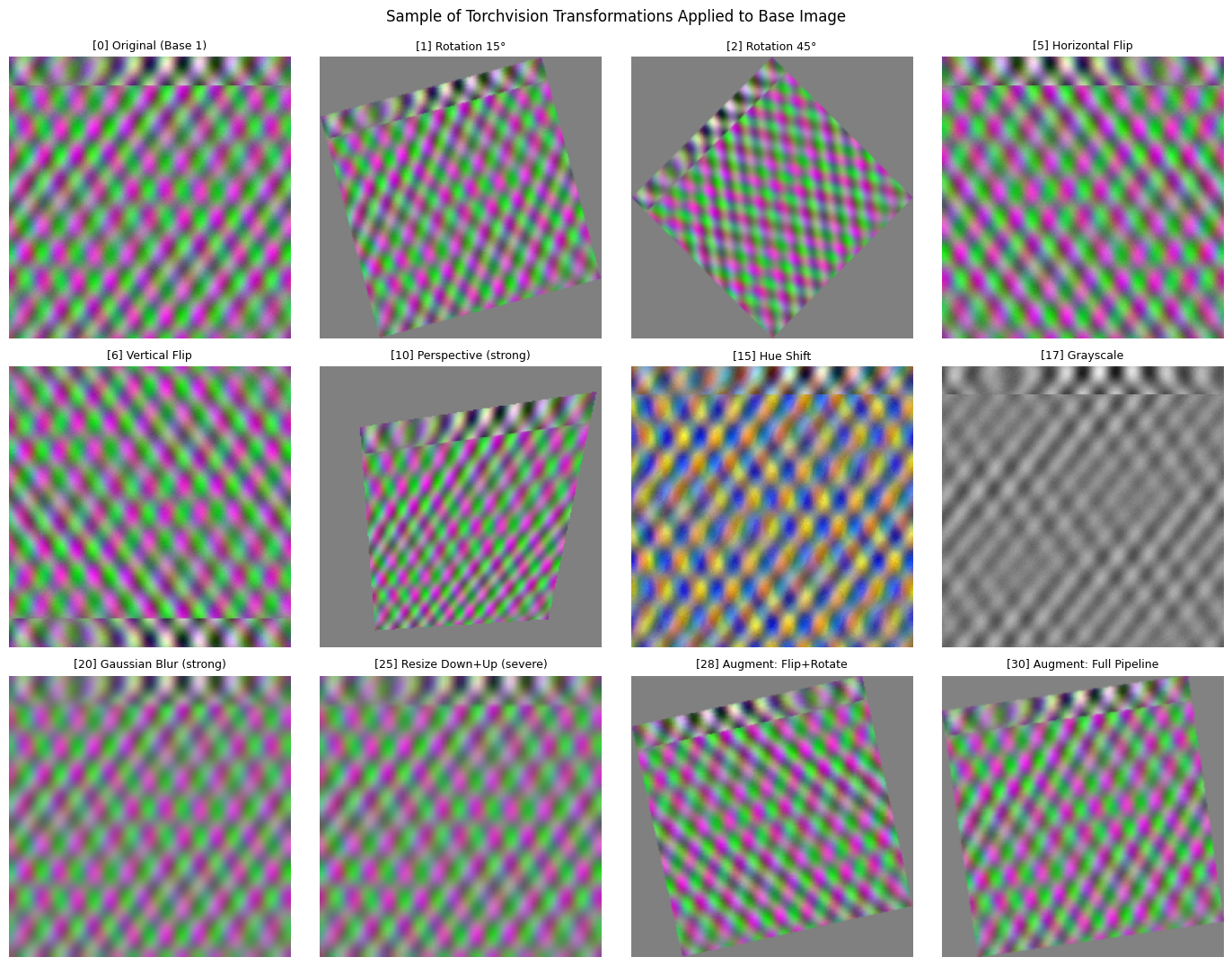
We’ll test a comprehensive set of common torchvision transformations, organized by category:
Category |
Transformations |
Expected Detection |
|---|---|---|
Geometric |
Rotation, Flip, Affine, Perspective |
High (SIFT is geometry-invariant) |
Color |
ColorJitter, Grayscale, Invert |
Medium (depends on intensity) |
Blur/Noise |
GaussianBlur, Noise |
Medium to Low |
Crop/Resize |
RandomCrop, Resize, CenterCrop |
Medium (depends on overlap) |
Severe |
RandomErasing, Heavy distortion |
Low (features destroyed) |
Important setup notes:
We use
expand=Truewith a resize-back step for rotation transforms so that the full rotated content is preserved (no black corners or clipped content).We use
fill=128(gray) instead of the defaultfill=0(black) where fill is unavoidable. Black fill creates strong artificial edges that SIFT detects, corrupting the BoVW histogram.
FILL = 128  # Gray fill avoids artificial SIFT edges that black (0) would create


def _n(degrees: int) -> Number:
    """Helper to cast degrees to Number for Pylance."""
    return cast(Number, degrees)


# Helper: rotate with expand=True to preserve full content, then resize back
def _rotate_and_resize(degrees):
    return T.Compose([T.RandomRotation(degrees=(degrees, degrees), expand=True, fill=FILL), T.Resize(IMG_SIZE)])


# Define transformation categories
transformations = {
    # Geometric transformations - SIFT should handle these well
    "Rotation 15°": _rotate_and_resize(15),
    "Rotation 45°": _rotate_and_resize(45),
    "Rotation 90°": _rotate_and_resize(90),
    "Rotation 180°": _rotate_and_resize(180),
    "Horizontal Flip": T.RandomHorizontalFlip(p=1.0),
    "Vertical Flip": T.RandomVerticalFlip(p=1.0),
    "Affine (rotate+translate)": T.RandomAffine(degrees=_n(30), translate=(0.1, 0.1), fill=FILL),
    "Affine (rotate+scale)": T.RandomAffine(degrees=_n(15), scale=(0.8, 1.2), fill=FILL),
    "Perspective (mild)": T.RandomPerspective(distortion_scale=0.2, p=1.0, fill=FILL),
    "Perspective (strong)": T.RandomPerspective(distortion_scale=0.5, p=1.0, fill=FILL),
    # Color transformations - may or may not be detected
    "Brightness +30%": T.ColorJitter(brightness=(1.3, 1.3)),
    "Brightness -30%": T.ColorJitter(brightness=(0.7, 0.7)),
    "Contrast +50%": T.ColorJitter(contrast=(1.5, 1.5)),
    "Saturation +50%": T.ColorJitter(saturation=(1.5, 1.5)),
    "Hue Shift": T.ColorJitter(hue=(0.3, 0.3)),
    "Full ColorJitter": T.ColorJitter(brightness=0.3, contrast=0.3, saturation=0.3, hue=0.1),
    "Grayscale": T.Grayscale(num_output_channels=3),
    "Color Invert": T.RandomInvert(p=1.0),
    # Blur and noise
    "Gaussian Blur (mild)": T.GaussianBlur(kernel_size=5, sigma=(1.0, 1.0)),
    "Gaussian Blur (strong)": T.GaussianBlur(kernel_size=11, sigma=(3.0, 3.0)),
    # Crop and resize
    "Center Crop (80%)": T.Compose([T.CenterCrop(180), T.Resize(IMG_SIZE)]),
    "Center Crop (50%)": T.Compose([T.CenterCrop(112), T.Resize(IMG_SIZE)]),
    "Random Crop (80%)": T.Compose([T.RandomCrop(180), T.Resize(IMG_SIZE)]),
    "Resize Down+Up": T.Compose([T.Resize(112), T.Resize(IMG_SIZE)]),
    "Resize Down+Up (severe)": T.Compose([T.Resize(56), T.Resize(IMG_SIZE)]),
    # Severe transformations - likely to break detection
    "Random Erasing (10%)": T.RandomErasing(p=1.0, scale=(0.02, 0.1)),
    "Random Erasing (33%)": T.RandomErasing(p=1.0, scale=(0.2, 0.33)),
    # Combinations (common augmentation pipelines)
    "Augment: Flip+Rotate": T.Compose(
        [
            T.RandomHorizontalFlip(p=1.0),
            T.RandomRotation(degrees=_n(15), expand=True, fill=FILL),
            T.Resize(IMG_SIZE),
        ]
    ),
    "Augment: Flip+Color": T.Compose(
        [
            T.RandomHorizontalFlip(p=1.0),
            T.ColorJitter(brightness=0.2, contrast=0.2),
        ]
    ),
    "Augment: Full Pipeline": T.Compose(
        [
            T.RandomHorizontalFlip(p=0.5),
            T.RandomRotation(degrees=_n(10), expand=True, fill=FILL),
            T.Resize(IMG_SIZE),
            T.ColorJitter(brightness=0.1, contrast=0.1),
            T.GaussianBlur(kernel_size=3, sigma=(0.5, 0.5)),
        ]
    ),
}
# Apply all transformations to base image 1
images = []
labels = []

# Add original images first
images.append(base_img1)
labels.append("Original (Base 1)")

# Apply each transformation to base image 1
base_pil = numpy_to_pil(base_img1)

for name, transform in transformations.items():
    torch.manual_seed(42)  # For reproducibility
    transformed = transform(base_pil)
    images.append(pil_to_numpy(transformed))
    labels.append(name)

# Add other base images as "unique" images (should NOT be detected as duplicates)
images.append(base_img2)
labels.append("Unique: Base 2")
images.append(base_img3)
labels.append("Unique: Base 3")

print(f"Created {len(images)} test images:")
print(f"  - {1} original")
print(f"  - {len(transformations)} transformations")
print(f"  - {2} unique (different base images)")
Created 33 test images:
  - 1 original
  - 30 transformations
  - 2 unique (different base images)
# Visualize a sample of transformations
sample_indices = [0, 1, 2, 5, 6, 10, 15, 17, 20, 25, 28, 30]
sample_indices = [i for i in sample_indices if i < len(images)]

n_cols = 4
n_rows = (len(sample_indices) + n_cols - 1) // n_cols
fig, axes = plt.subplots(n_rows, n_cols, figsize=(14, 3.5 * n_rows))
axes = axes.flatten()

for ax_idx, img_idx in enumerate(sample_indices):
    img = images[img_idx]
    axes[ax_idx].imshow(np.transpose(img, (1, 2, 0)))
    axes[ax_idx].set_title(f"[{img_idx}] {labels[img_idx]}", fontsize=9)
    axes[ax_idx].axis("off")

for i in range(len(sample_indices), len(axes)):
    axes[i].axis("off")

plt.tight_layout()
plt.suptitle("Sample of Torchvision Transformations Applied to Base Image", y=1.02, fontsize=12)
plt.show()
Running near-duplicate detection
We’ll use both hash-based detection (D4 hashes) and BoVWExtractor to compare their effectiveness on different transformations.
# Method 1: D4 Hash-based detection (rotation/flip invariant at 90° increments)
d4_detector = Duplicates(flags=ImageStats.HASH_DUPLICATES_D4)
d4_results = d4_detector.evaluate(images)

print("=== D4 Hash Results ===")
print("\nNear duplicates detected:")
if d4_results.near:
    for i, (indices, methods) in enumerate(d4_results.near):
        print(f"  Group: {i} - {methods}")
        for idx in indices:
            print(f"    {idx:<2} - {labels[idx]}")
        print()
else:
    print("  None found")
=== D4 Hash Results ===

Near duplicates detected:
  Group: 0 - ['dhash_d4', 'phash_d4']
    0  - Original (Base 1)
    3  - Rotation 90°
    4  - Rotation 180°
    5  - Horizontal Flip
    6  - Vertical Flip
    12 - Brightness -30%
    14 - Saturation +50%
    18 - Color Invert
    19 - Gaussian Blur (mild)
    20 - Gaussian Blur (strong)

  Group: 1 - ['dhash_d4']
    17 - Grayscale
    25 - Resize Down+Up (severe)
# Method 2: BoVW-based detection (rotation invariant at any angle)
# Use a smaller vocab_size for this small dataset (~32 images).
# Large vocabularies create sparse histograms that cluster poorly.
bovw_extractor = BoVWExtractor(vocab_size=32)
cluster_sensitivity = 1.75

bovw_detector = Duplicates(
    flags=ImageStats.NONE,  # Skip hash computation, use only clustering
    extractor=bovw_extractor,
    batch_size=64,
    cluster_sensitivity=cluster_sensitivity,
)
bovw_results = bovw_detector.evaluate(images)

print("=== BoVW Results ===")
print("\nNear duplicates detected:")
if bovw_results.near:
    for i, (indices, methods) in enumerate(bovw_results.near):
        print(f"  Group: {i} - {methods}")
        for idx in indices:
            print(f"    {idx:<2} - {labels[idx]}")
        print()
else:
    print("  None found")
=== BoVW Results ===

Near duplicates detected:
  Group: 0 - ['cluster']
    0  - Original (Base 1)
    1  - Rotation 15°
    2  - Rotation 45°
    3  - Rotation 90°
    4  - Rotation 180°
    7  - Affine (rotate+translate)
    9  - Perspective (mild)
    10 - Perspective (strong)
    11 - Brightness +30%
    13 - Contrast +50%
    14 - Saturation +50%
    17 - Grayscale
    18 - Color Invert
    19 - Gaussian Blur (mild)
    24 - Resize Down+Up
    30 - Augment: Full Pipeline

  Group: 1 - ['cluster']
    5  - Horizontal Flip
    6  - Vertical Flip
    28 - Augment: Flip+Rotate
    29 - Augment: Flip+Color

  Group: 2 - ['cluster']
    20 - Gaussian Blur (strong)
    25 - Resize Down+Up (severe)
# Method 3: Combined detection (both hashes and BoVW)
combined_detector = Duplicates(
    flags=ImageStats.HASH_DUPLICATES_D4,
    extractor=bovw_extractor,
    cluster_sensitivity=cluster_sensitivity,
)
combined_results = combined_detector.evaluate(images)

print("=== Combined (D4 Hash + BoVW) Results ===")
print("\nNear duplicates detected:")
if combined_results.near:
    for i, (indices, methods) in enumerate(combined_results.near):
        print(f"  Group: {i} - {methods}")
        for idx in indices:
            print(f"    {idx:<2} - {labels[idx]}")
        print()
else:
    print("  None found")
=== Combined (D4 Hash + BoVW) Results ===

Near duplicates detected:
  Group: 0 - ['cluster', 'dhash_d4', 'phash_d4']
    0  - Original (Base 1)
    1  - Rotation 15°
    2  - Rotation 45°
    3  - Rotation 90°
    4  - Rotation 180°
    5  - Horizontal Flip
    6  - Vertical Flip
    7  - Affine (rotate+translate)
    9  - Perspective (mild)
    10 - Perspective (strong)
    11 - Brightness +30%
    12 - Brightness -30%
    13 - Contrast +50%
    14 - Saturation +50%
    17 - Grayscale
    18 - Color Invert
    19 - Gaussian Blur (mild)
    20 - Gaussian Blur (strong)
    24 - Resize Down+Up
    25 - Resize Down+Up (severe)
    28 - Augment: Flip+Rotate
    29 - Augment: Flip+Color
    30 - Augment: Full Pipeline
Analyzing detection results by transformation type
Let’s analyze which transformations were detected as near-duplicates.
def get_detected_indices(results: DuplicatesOutput):
    """Extract all indices detected as duplicates of index 0 (original)."""
    detected = set()
    if results.near:
        for indices, _ in results.near:
            if 0 in indices:  # Group contains the original
                detected.update(indices)
    detected.discard(0)  # Remove the original itself
    return detected


d4_detected = get_detected_indices(d4_results)
bovw_detected = get_detected_indices(bovw_results)
combined_detected = get_detected_indices(combined_results)

print("Detection Summary:")
print(f"  D4 Hashes detected: {len(d4_detected)} transformations")
print(f"  BoVW detected: {len(bovw_detected)} transformations")
print(f"  Combined detected: {len(combined_detected)} transformations")
Detection Summary:
  D4 Hashes detected: 9 transformations
  BoVW detected: 15 transformations
  Combined detected: 22 transformations
# Create a detailed comparison table
print("\nDetailed Detection Results:")
print("=" * 70)
print(f"{'Transformation':<35} {'D4 Hash':<10} {'BoVW':<10} {'Combined':<10}")
print("=" * 70)

# Skip index 0 (original) and last 2 (unique images)
for i in range(1, len(images) - 2):
    d4_status = "Yes" if i in d4_detected else "No"
    bovw_status = "Yes" if i in bovw_detected else "No"
    combined_status = "Yes" if i in combined_detected else "No"
    print(f"{labels[i]:<35} {d4_status:<10} {bovw_status:<10} {combined_status:<10}")

print("=" * 70)

# Check unique images (should NOT be detected)
print("\nUnique Image Verification (should NOT be detected):")
for i in range(len(images) - 2, len(images)):
    d4_status = "DETECTED" if i in d4_detected else "OK"
    bovw_status = "DETECTED" if i in bovw_detected else "OK"
    combined_status = "DETECTED" if i in combined_detected else "OK"
    print(f"  {labels[i]}: D4={d4_status}, BoVW={bovw_status}, Combined={combined_status}")
Detailed Detection Results:
======================================================================
Transformation                      D4 Hash    BoVW       Combined
======================================================================
Rotation 15°                        No         Yes        Yes
Rotation 45°                        No         Yes        Yes
Rotation 90°                        Yes        Yes        Yes
Rotation 180°                       Yes        Yes        Yes
Horizontal Flip                     Yes        No         Yes
Vertical Flip                       Yes        No         Yes
Affine (rotate+translate)           No         Yes        Yes
Affine (rotate+scale)               No         No         No
Perspective (mild)                  No         Yes        Yes
Perspective (strong)                No         Yes        Yes
Brightness +30%                     No         Yes        Yes
Brightness -30%                     Yes        No         Yes
Contrast +50%                       No         Yes        Yes
Saturation +50%                     Yes        Yes        Yes
Hue Shift                           No         No         No
Full ColorJitter                    No         No         No
Grayscale                           No         Yes        Yes
Color Invert                        Yes        Yes        Yes
Gaussian Blur (mild)                Yes        Yes        Yes
Gaussian Blur (strong)              Yes        No         Yes
Center Crop (80%)                   No         No         No
Center Crop (50%)                   No         No         No
Random Crop (80%)                   No         No         No
Resize Down+Up                      No         Yes        Yes
Resize Down+Up (severe)             No         No         Yes
Random Erasing (10%)                No         No         No
Random Erasing (33%)                No         No         No
Augment: Flip+Rotate                No         No         Yes
Augment: Flip+Color                 No         No         Yes
Augment: Full Pipeline              No         Yes        Yes
======================================================================

Unique Image Verification (should NOT be detected):
  Unique: Base 2: D4=OK, BoVW=OK, Combined=OK
  Unique: Base 3: D4=OK, BoVW=OK, Combined=OK
Visualizing detected vs missed transformations
# Categorize results
detected_by_both = bovw_detected & d4_detected
detected_by_bovw_only = bovw_detected - d4_detected
detected_by_d4_only = d4_detected - bovw_detected
missed_by_both = set(range(1, len(images) - 2)) - bovw_detected - d4_detected

print("Categorized Results:")
print(f"\nDetected by BOTH D4 and BoVW ({len(detected_by_both)}):")
for i in sorted(detected_by_both):
    print(f"  [{i}] {labels[i]}")

print(f"\nDetected by BoVW ONLY ({len(detected_by_bovw_only)}):")
for i in sorted(detected_by_bovw_only):
    print(f"  [{i}] {labels[i]}")

print(f"\nDetected by D4 ONLY ({len(detected_by_d4_only)}):")
for i in sorted(detected_by_d4_only):
    print(f"  [{i}] {labels[i]}")

print(f"\nMissed by BOTH ({len(missed_by_both)}):")
for i in sorted(missed_by_both):
    print(f"  [{i}] {labels[i]}")
Categorized Results:

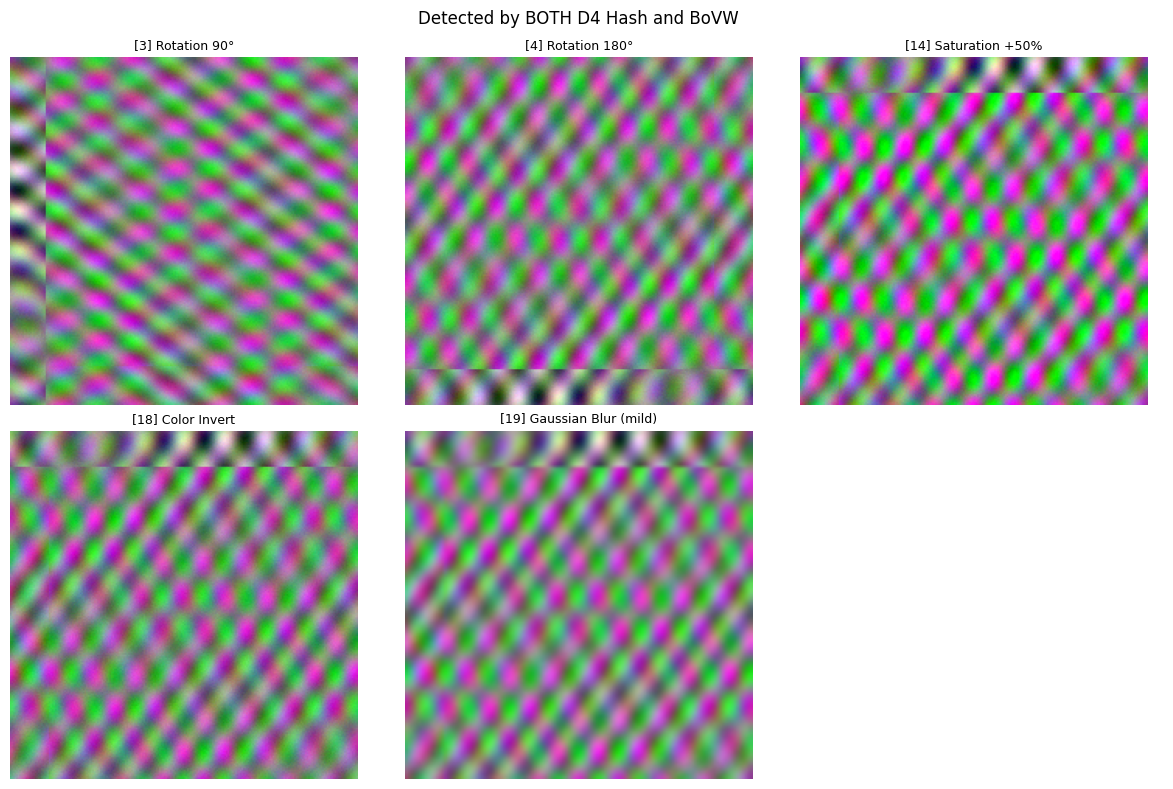
Detected by BOTH D4 and BoVW (5):
  [3] Rotation 90°
  [4] Rotation 180°
  [14] Saturation +50%
  [18] Color Invert
  [19] Gaussian Blur (mild)

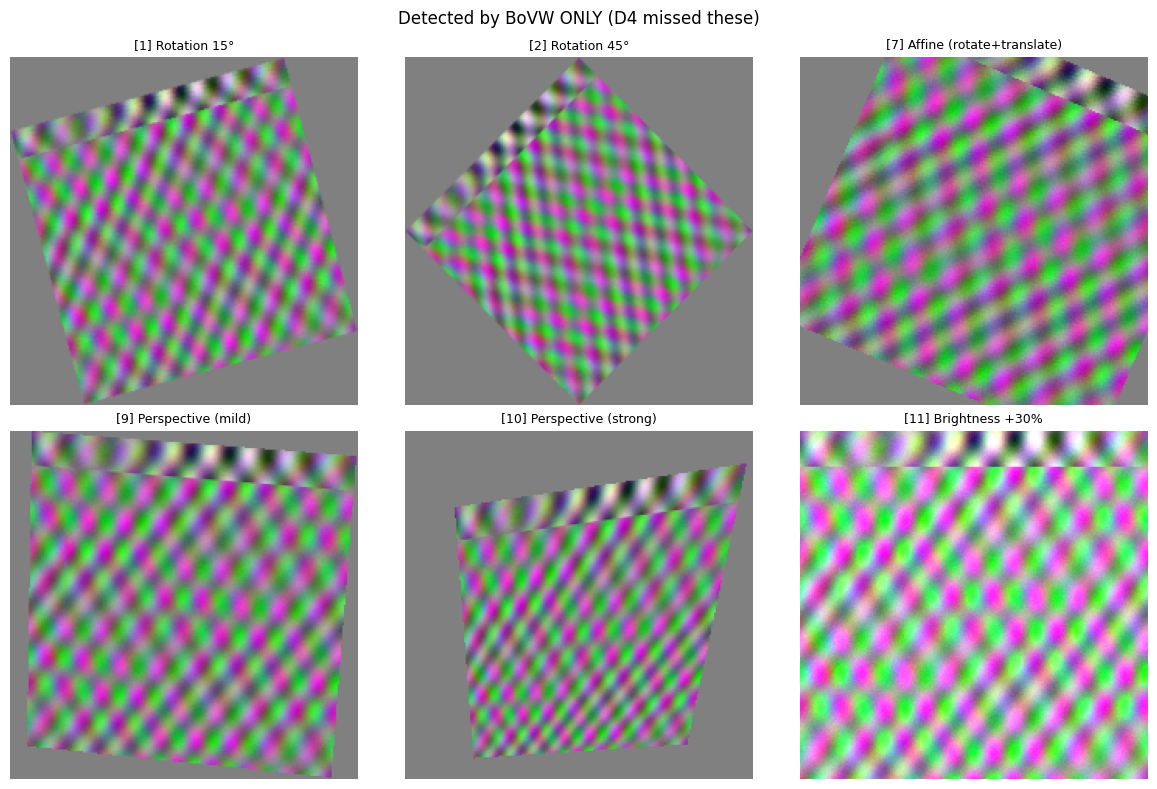
Detected by BoVW ONLY (10):
  [1] Rotation 15°
  [2] Rotation 45°
  [7] Affine (rotate+translate)
  [9] Perspective (mild)
  [10] Perspective (strong)
  [11] Brightness +30%
  [13] Contrast +50%
  [17] Grayscale
  [24] Resize Down+Up
  [30] Augment: Full Pipeline

Detected by D4 ONLY (4):
  [5] Horizontal Flip
  [6] Vertical Flip
  [12] Brightness -30%
  [20] Gaussian Blur (strong)

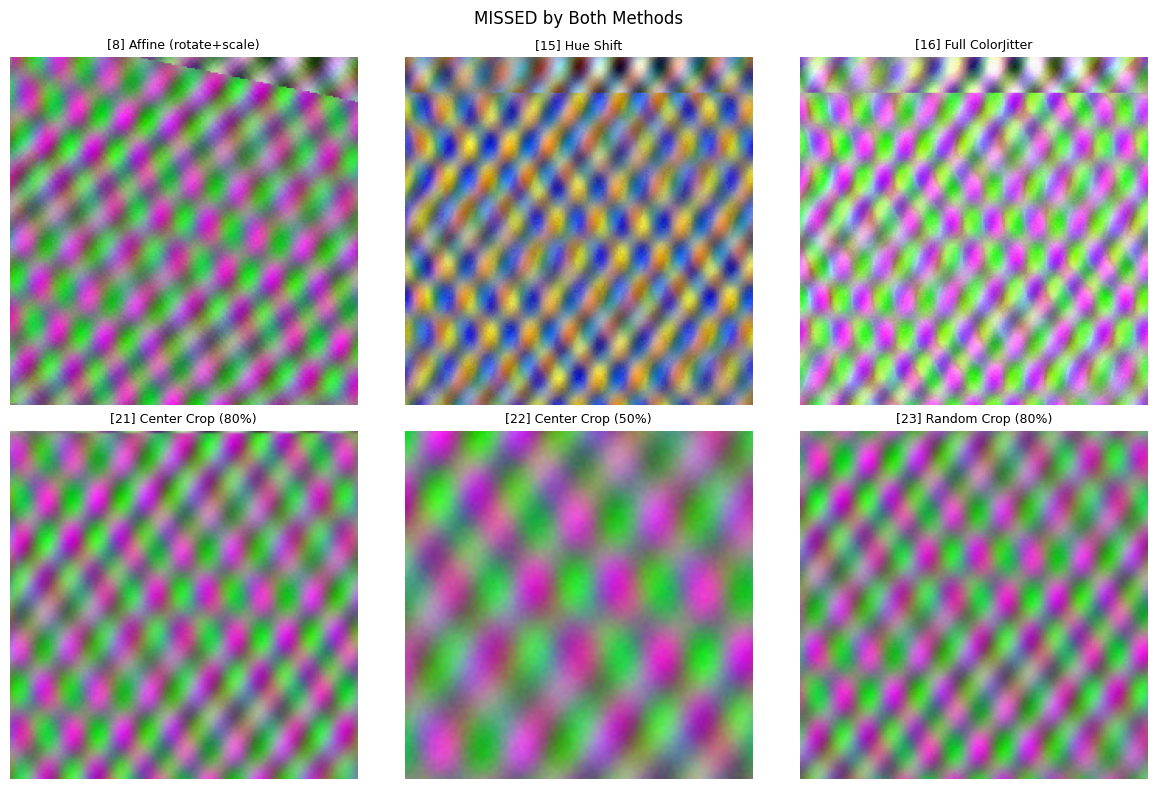
Missed by BOTH (11):
  [8] Affine (rotate+scale)
  [15] Hue Shift
  [16] Full ColorJitter
  [21] Center Crop (80%)
  [22] Center Crop (50%)
  [23] Random Crop (80%)
  [25] Resize Down+Up (severe)
  [26] Random Erasing (10%)
  [27] Random Erasing (33%)
  [28] Augment: Flip+Rotate
  [29] Augment: Flip+Color
# Visualize some of the detected and missed transformations
def visualize_category(indices, title, max_display=6):
    """Visualize images in a category."""
    if not indices:
        print(f"{title}: No images")
        return

    indices = sorted(indices)[:max_display]
    n_cols = min(len(indices), 3)
    n_rows = (len(indices) + n_cols - 1) // n_cols

    fig, axes = plt.subplots(n_rows, n_cols, figsize=(4 * n_cols, 4 * n_rows))
    axes = [axes] if n_rows * n_cols == 1 else axes.flatten()

    for ax_idx, img_idx in enumerate(indices):
        axes[ax_idx].imshow(np.transpose(images[img_idx], (1, 2, 0)))
        axes[ax_idx].set_title(f"[{img_idx}] {labels[img_idx]}", fontsize=9)
        axes[ax_idx].axis("off")

    for i in range(len(indices), len(axes)):
        axes[i].axis("off")

    plt.suptitle(title, fontsize=12)
    plt.tight_layout()
    plt.show()


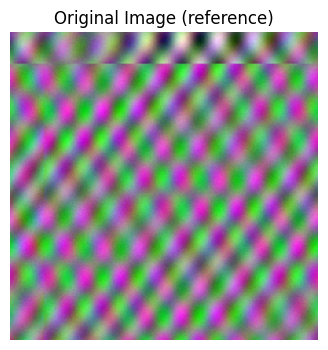
# Show original for reference
fig, ax = plt.subplots(1, 1, figsize=(4, 4))
ax.imshow(np.transpose(images[0], (1, 2, 0)))
ax.set_title("Original Image (reference)", fontsize=12)
ax.axis("off")
plt.show()

# Show each category
visualize_category(detected_by_both, "Detected by BOTH D4 Hash and BoVW")
visualize_category(detected_by_bovw_only, "Detected by BoVW ONLY (D4 missed these)")
visualize_category(missed_by_both, "MISSED by Both Methods")
Adjusting detection sensitivity
The cluster_sensitivity parameter controls how strict the near-duplicate detection is. Let’s see how different
thresholds affect detection.
# Test different cluster thresholds
thresholds = [0.75, 1.0, 1.5, 2.0, 2.5]
threshold_results = {}

for threshold in thresholds:
    detector = Duplicates(
        flags=ImageStats.NONE,
        extractor=bovw_extractor,
        cluster_sensitivity=threshold,
    )
    results = detector.evaluate(images)
    detected = get_detected_indices(results)
    threshold_results[threshold] = detected
    print(f"Threshold {threshold}: {len(detected)} transformations detected")
Threshold 0.75: 0 transformations detected
Threshold 1.0: 3 transformations detected
Threshold 1.5: 6 transformations detected
Threshold 2.0: 17 transformations detected
Threshold 2.5: 22 transformations detected
# Show how detection changes with threshold
print("\nTransformations detected at each threshold:")
print("=" * 90)
header = f"{'Transformation':<35}"
for t in thresholds:
    header += f" {t:<8}"
print(header)
print("=" * 90)

for i in range(1, len(images) - 2):
    row = f"{labels[i]:<35}"
    for t in thresholds:
        status = "Yes" if i in threshold_results[t] else "-"
        row += f" {status:<8}"
    print(row)

print("=" * 90)
Transformations detected at each threshold:
==========================================================================================
Transformation                      0.75     1.0      1.5      2.0      2.5
==========================================================================================
Rotation 15°                        -        -        -        Yes      Yes
Rotation 45°                        -        -        -        Yes      Yes
Rotation 90°                        -        -        Yes      Yes      Yes
Rotation 180°                       -        -        Yes      Yes      Yes
Horizontal Flip                     -        -        -        -        -
Vertical Flip                       -        -        -        -        -
Affine (rotate+translate)           -        -        -        Yes      Yes
Affine (rotate+scale)               -        -        -        Yes      Yes
Perspective (mild)                  -        -        -        Yes      Yes
Perspective (strong)                -        -        -        Yes      Yes
Brightness +30%                     -        -        -        Yes      Yes
Brightness -30%                     -        -        -        Yes      Yes
Contrast +50%                       -        -        -        Yes      Yes
Saturation +50%                     -        -        Yes      Yes      Yes
Hue Shift                           -        -        -        -        -
Full ColorJitter                    -        -        -        -        Yes
Grayscale                           -        Yes      Yes      Yes      Yes
Color Invert                        -        -        -        Yes      Yes
Gaussian Blur (mild)                -        Yes      Yes      Yes      Yes
Gaussian Blur (strong)              -        -        -        -        Yes
Center Crop (80%)                   -        -        -        -        Yes
Center Crop (50%)                   -        -        -        -        -
Random Crop (80%)                   -        -        -        -        Yes
Resize Down+Up                      -        Yes      Yes      Yes      Yes
Resize Down+Up (severe)             -        -        -        -        Yes
Random Erasing (10%)                -        -        -        -        -
Random Erasing (33%)                -        -        -        -        -
Augment: Flip+Rotate                -        -        -        -        -
Augment: Flip+Color                 -        -        -        -        -
Augment: Full Pipeline              -        -        -        Yes      Yes
==========================================================================================
Key findings and recommendations
Transformations detected as near-duplicates
Transformation Type |
D4 Hash |
BoVW |
Notes |
|---|---|---|---|
Rotation (90° increments) |
Yes |
Yes |
Both methods detect 90° and 180° reliably |
Rotation (arbitrary angles) |
No |
Yes |
BoVW’s SIFT features are rotation-invariant at any angle |
Horizontal/Vertical Flip |
Yes |
No |
BoVW clusters flips separately from the original; D4 is designed for this |
Perspective |
No |
Yes |
BoVW detects both mild and strong perspective distortion |
Affine (rotate+translate) |
No |
Yes |
BoVW handles combined rotation and translation |
Brightness / Contrast / Saturation |
Partial |
Partial |
Both detect some color shifts; depends on which channel is affected |
Grayscale |
No |
Yes |
SIFT operates on luminance, so grayscale conversion preserves features |
Color Inversion |
Yes |
Yes |
Both methods detect inversion |
Gaussian Blur (mild) |
Yes |
Yes |
Both methods tolerate mild blur |
Gaussian Blur (strong) |
Yes |
No |
D4 hashes are more resilient to strong blur than SIFT |
Resize Down+Up |
No |
Yes |
BoVW detects mild resolution loss; both miss severe downsampling |
Transformations missed by both methods
Transformation Type |
Why Missed |
|---|---|
Hue shift / Full ColorJitter |
Changes pixel values enough to alter both hashes and SIFT descriptors |
All crops (center, random) |
Removes too much content; remaining features don’t match the full-image histogram |
Severe downsampling |
Destroys fine-grained SIFT keypoints and alters hash signatures |
Random erasing |
Destroys local features in erased regions |
Affine (rotate+scale) |
Combined scaling with rotation changes SIFT descriptor distributions |
Complementary strengths
A key finding is that D4 hashes and BoVW have complementary detection strengths:
D4 detects but BoVW misses: Flips, brightness reduction, strong blur
BoVW detects but D4 misses: Arbitrary rotations, perspective, affine, grayscale, mild resize, contrast shifts
The combined method detected 22 out of 30 transformations (73%) by merging groups across both methods.
Recommendations
Use both methods together for best coverage — they complement each other well
For detecting rotated copies: D4 hashes handle 90° increments and flips; add BoVW for arbitrary angles
For data augmentation validation: Use BoVW with a higher
cluster_sensitivity(1.5–2.0) to catch subtle duplicatesFor large datasets: Start with fast D4 hashes, then run BoVW on remaining candidates
Adjust
cluster_sensitivity: Lower (1.0–1.25) for strict matching, higher (1.5–2.0) for permissive — note that no transformations are detected at 0.75
What’s next
In addition to exploring the duplicates in a dataset, DataEval offers additional tutorials on exploratory data analysis:
Clean a dataset with the labels in the Data Cleaning Guide
Identify Bias and Correlations in your metadata
Determine how the data groups by assessing the data space
Explore deeper explanations on topics such as duplicates, outliers, and coverage in the Concept pages.
To learn more about setting a global seed in DataEval, see the hardware configuration how-to.
On your own
Once you are familiar with DataEval and data analysis, run this analysis on your own dataset. When you do, make sure that you analyze all of your data and not just the training set.